



Booking Online - My Account FAQ
You have requested a new password for your www.irishrail.ie account. Please follow the instructions below to reset your password and gain access to your account.
How to Reset your password:
- Click the 'Rest Password' Button in the 'reset my password' email or copy and paste the link provided
- You will then be brought to a 'Create Password' screen.
- Simply enter your new password. Your new password should be a minimum of 8 characters and contain at least one number, one symbol, one capital and one lower case letter, example - Ireland123!
- Click on 'My Account'
- Enter your "e-mail address" and "password", click on "Login"
- From the menu of the left (desktop/ Tablet) or the hamburger menu (on mobile) select the section you want to change and click on "Save". You will get a message to say that your details have been updated
- Select "Logout"
Here are some of the benefits of having an Iarnrod Eireann Account;
- Manage your bookings with a simple login
- Skip registration
- More payment options
- Easily upgrade your journey
You can only create an account during a booking. To create an account select the options "I wish to create an Iarnród Éireann account" when entering your contact details when booking. Then you will receive an email and a password to your account.
Bookings made prior to the 24th April cannot be viewed online. Please Contact Us to retrieve your previous bookings.
- Click on 'My Account'
- Enter your e-mail address and password, click on 'Login'
- From the menu of the left (desktop/ Tablet) or the hamburger menu (on mobile) select the 'Change Password' option
- In the first field 'Current password' enter your current password or if you reset your password enter the 'Temporary Password' you received
- In the last two fields ‘New password’ and ‘Repeat new password’ please ensure that your new password meets the required criteria. Your password should contain at least one number, one symbol, one capital and one lower case letter, example - Ireland123!
- The password entered into both fields must match.
- Click 'Change password', once successful a green message will appear at the top of the page to say that your password has been updated
If you are looking to reset your password please click below.
Please see our step by step guide on creating an account for more information.
In line with our GDPR policy if an account is inactive for 13 months then your Iarnród Éireann account is deleted.
You can set up a new account next time you are booking or on the login page. When the option to enter your account details or proceed as a guest comes up, click proceed as a guest and enter your details as normal.
To set up an account simply tick the box which says ‘Yes, I wish to create an Iarnród Éireann account’. The tick box can be found in ‘Personal Details’ and under ‘Customer details’ as seen in the screen shot below. Once your booking has been confirmed you will receive an email with your account details.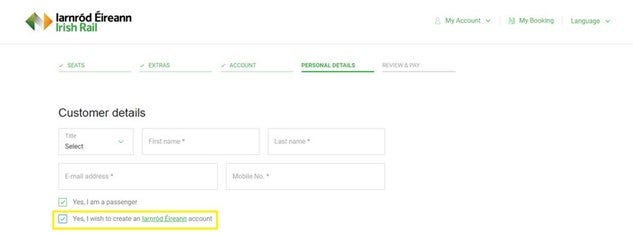
- Click on "My Account"
- Enter your "e-mail address" and "password", click on "Login"
- From the menu of the left (desktop/ Tablet) or the hamburger menu (on mobile) select the "Booking History" option. You will see all of your previous bookings
- Select "Logout".
We advise customers to reset their passwords via the My Account Forgotten Password link.
Please ensure that your password is a minimum of eight characters and contains at least one digit, one upper case character and one symbol example Ireland1!